MA Technologies

Business Management Systems (ERP – All-in-One Business Control)

ERP System Development in Sri Lanka

Bring business information into a more connected workflow. MA Technologies develops ERP solutions around agreed operational needs, helping teams coordinate areas such as inventory, purchasing, sales, finance, and reporting through a shared business management system.

Rather than forcing your team into a rigid package, we scope the modules, user roles, and workflows you actually need, and introduce them in stages your team can adopt.

Common challenges

When it is time to connect your operations

  1. Each department keeps its own records

    Sales, stores, purchasing, and accounts use separate spreadsheets or systems that rarely agree.

  2. Stock figures are never quite right

    Without a single record of stock movements, counts drift and purchasing relies on guesswork.

  3. Branches work differently

    Each location follows its own process, making it hard to compare performance or move stock between them.

  4. Management reports arrive too late

    By the time figures are combined, the decisions they should inform have already been made.

What we can include

What an ERP implementation can include

Every implementation is scoped to your operations. Depending on what we agree, the work can cover:

Automate: Simplify operations
  • Requirements analysis

    Understanding how each department works today and what the system must support.

  • Suitable modules

    Areas such as inventory, purchasing, sales, finance, and reporting, selected and scoped for your business.

  • User roles and permissions

    Access levels that match responsibilities, so people see and change only what they should.

  • Approvals

    Structured approval steps for purchases, discounts, or other decisions that need sign-off.

  • Branch workflows

    Support for multiple locations, stock transfers, and branch-level reporting where needed.

  • Data migration

    Moving existing product, customer, supplier, and opening balance data into the new system.

  • Integrations

    Connections to POS, e-commerce, or other systems where they are feasible and agreed.

  • Training, deployment, and support

    Role-based staff training, a planned go-live, and an agreed support arrangement.

Proof of work

Projects we have delivered

See more of our work
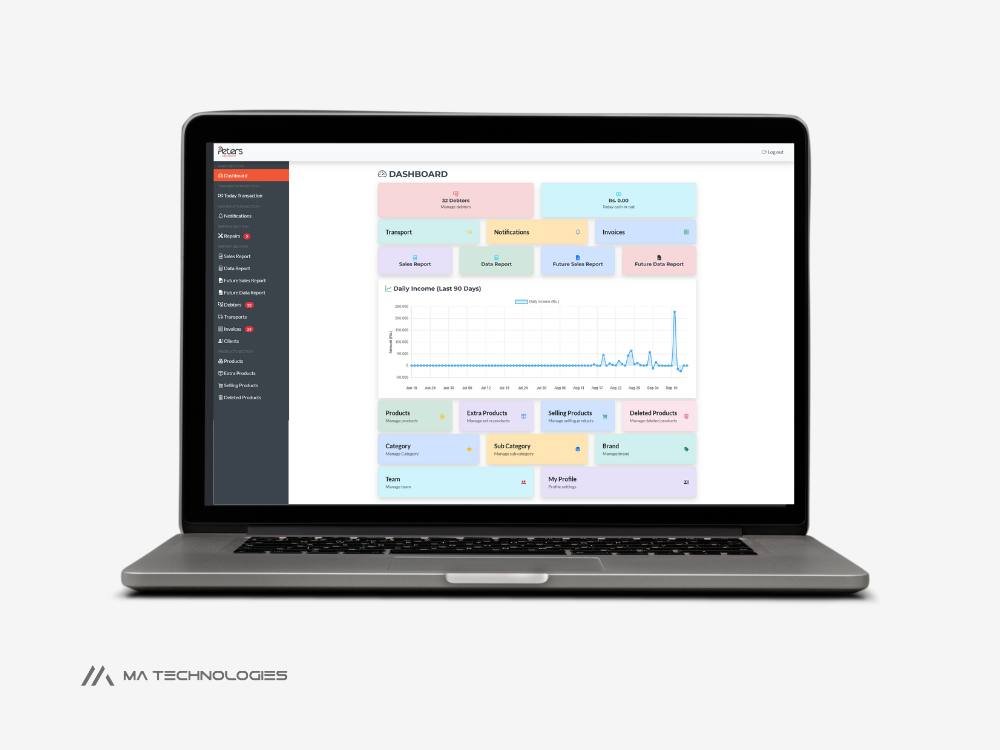
Equipment rental ERP dashboard on a laptop showing debtors, invoices, and a daily income chart

Real-time reporting, invoicing, and payments

Equipment Rental ERP

A business management system for an equipment rental company, bringing debtors, invoices, transport, sales reports, and daily income into one dashboard.

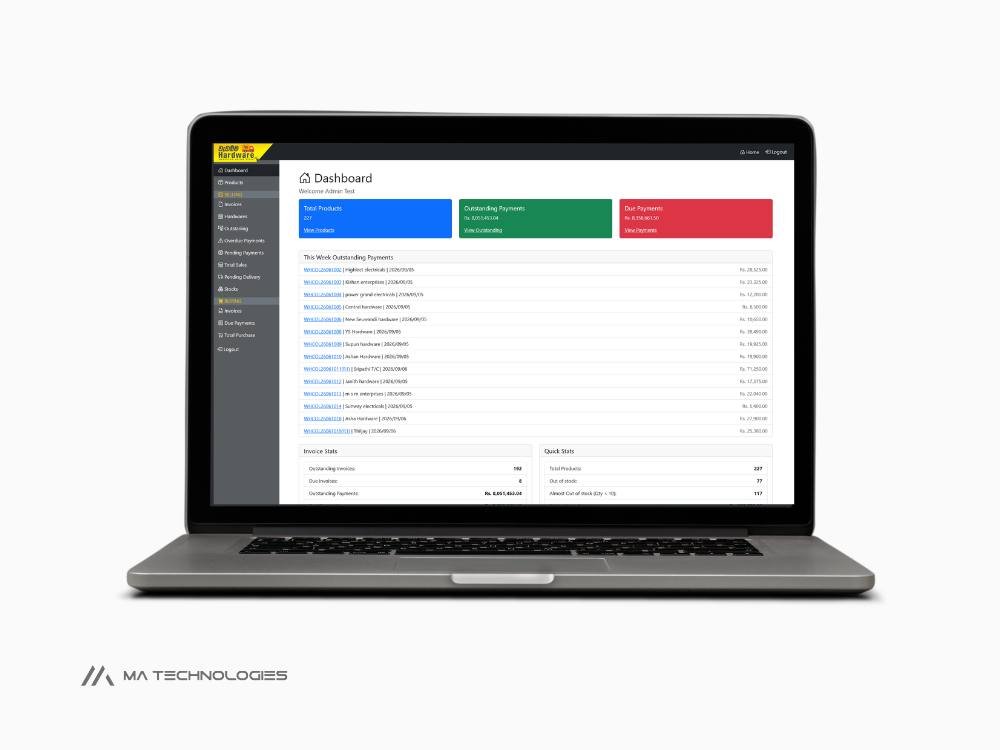
Distribution management dashboard on a laptop showing outstanding payments and stock statistics

Week-long deliveries brought down to next day

Distribution Management App

A distribution system that tracks invoices, outstanding and due payments, pending deliveries, and stock in one place, helping the business move from week-long deliveries to next-day delivery.

How it fits together

From order to stock to report

Here is an example of a connected workflow. A sales order is entered and approved. The system reserves stock and alerts purchasing when levels fall below an agreed point. Goods received update stock automatically, and the sale, purchase, and stock movement all feed the same management reports, so everyone works from one set of figures.

Exactly which modules you need, and how accounting, payroll, tax handling, or real-time synchronisation work, depends on the scoped implementation. We do not imply regulatory certification or universal compatibility. Instead, we define these requirements together and confirm what the system will and will not do before development starts.

Example workflow
  1. Sales order entered and approved
  2. Stock reserved automatically
  3. Purchasing alerted at low stock
  4. Goods received update stock
  5. Shared management reports

How it works

From first conversation to launch

A clear sequence of steps, so you always know what happens next and what we need from you.

  1. Step 1: Requirements analysis

    We map each department’s processes and agree priorities.

  2. Step 2: Solution design

    We define modules, roles, approvals, and integrations, and plan delivery in phases.

  3. Step 3: Build and configure

    We develop the first modules and configure them around your data.

  4. Step 4: Migration and testing

    We move existing records and test real scenarios with your team.

  5. Step 5: Training and go-live

    We train staff, support the go-live, and add further modules in later phases.

Pricing

What affects the cost

ERP costs depend on the scope of the implementation, including:

  • Number of modules and the complexity of each workflow
  • Number of users, roles, and branches
  • Volume and quality of the data to migrate
  • Integrations with POS, e-commerce, or accounting systems
  • Reporting requirements
  • Training, deployment, and ongoing support

A quote based on your scope

We do not publish fixed prices because every project is different. After a short discovery conversation, we prepare a quote based on the scope we agree together.

Request a Quote

FAQ

Questions about ERP Systems

Answers to the questions businesses most often ask before starting. If yours is not here, ask us directly.

Ask us a question
Can we start with selected modules?

Yes, and we often recommend it. Starting with the area that causes the most difficulty, such as inventory or sales, lets your team adopt the system gradually. Further modules can be added in planned phases once the first ones are working well.

Can existing records be migrated?

In most cases, yes. We review your existing spreadsheets or systems, agree what data to carry over, clean and map it to the new structure, and check the results with your team before go-live. The effort depends on how much data there is and how consistent it is.

Does the system support multiple branches?

It can. If you operate several locations, we scope branch-level stock, transfers, user permissions, and reporting as part of the requirements, so head office and each branch see the information they need.

How are staff trained?

We train people according to their roles, using your own data and workflows wherever possible. Training usually takes place before and during go-live, with simple guides for everyday tasks and an agreed support channel for questions afterwards.

Related services

View all eleven services
  • Automate

    Billing & POS

    Simpler checkout, invoicing, stock tracking, and sales reporting, shaped around your retail or service operation.

    Explore billing and POS systems
  • Automate

    Business Software & AI

    Custom applications and carefully selected AI tools that reduce repetitive manual work across your team.

    Explore business software and AI tools
  • Automate

    IT Support & Consulting

    Support and clear advice for reviewing current systems, choosing software, and planning practical next steps.

    Explore IT support and consulting

Ready to connect your operations?

Tell us which parts of your business are hardest to manage today. We will help you plan a practical first phase.

Discuss Your ERP Requirements